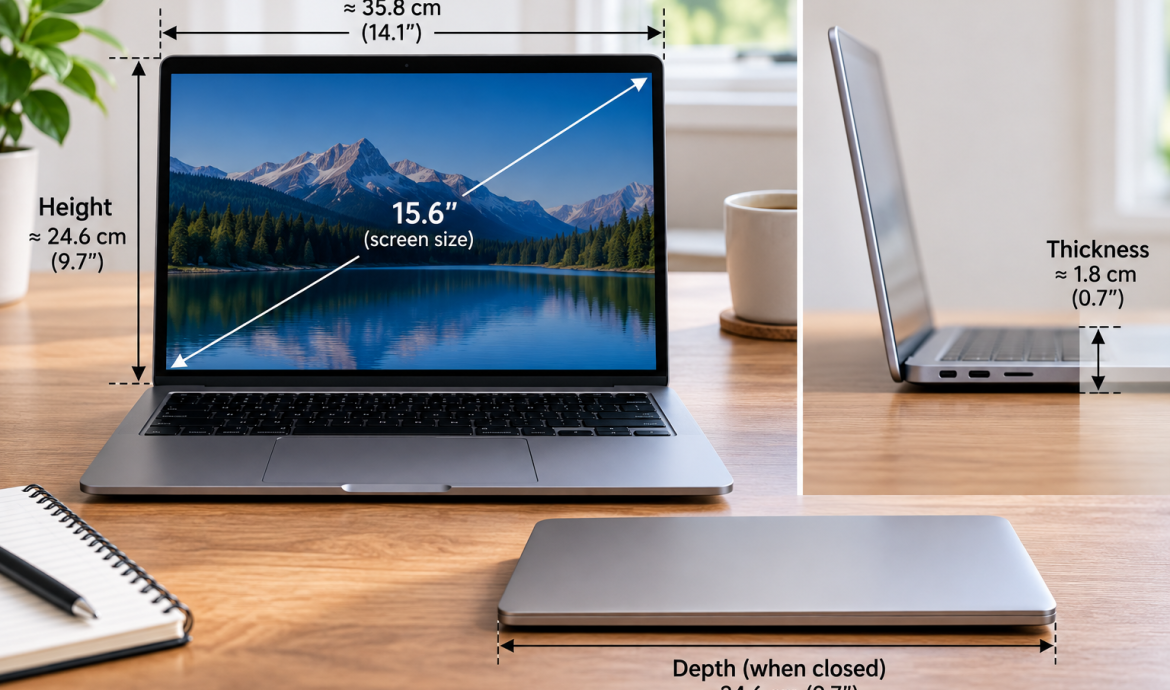
Laptop Size Guide: Screen, Dimensions and Sleeve Fit
World of TechLaptop size can mean two different things. The advertised 13-, 14- or 15.6-inch size refers to the diagonal measurement of the visible screen, excluding the bezel. If you need a sleeve, case or laptop bag, measure the closed laptop itself instead: width from side to side, depth from front to back and thickness from bottom to top.
Two laptops with the same screen size can have different physical dimensions, so the screen measurement alone does not guarantee that an accessory will fit.
How Are Laptop Sizes Measured?
There are two measurements people commonly mean when they talk about laptop size.
Screen Size
Typical laptop screen sizes include:
- 11.6 inches;
- 13.3 inches;
- 14 inches;
- 15.6 inches;
- 16 inches;
- 17.3 inches.
This number describes the diagonal of the visible display area.
It does not describe the width of the laptop lid or the overall chassis.
Physical Laptop Dimensions
The physical size of the laptop is normally expressed using three measurements:
- width — left edge to right edge;
- depth — front edge to rear or hinge edge;
- thickness/height — bottom to top when the laptop is closed.
These measurements matter when choosing a:
- laptop sleeve;
- fitted case;
- laptop bag;
- backpack compartment.
The key point is simple: a 15.6-inch laptop is not 15.6 inches wide.
Dell similarly distinguishes the display measurement from the dimensions of the complete laptop when explaining how to measure a device for bags and sleeves.
Dell — How to Measure Your Laptop Size
Laptop Screen Size
To measure a laptop screen correctly:
- Open the laptop.
- Find one corner of the visible display.
- Measure diagonally to the opposite visible corner.
- Do not include the bezel.
- Record the result in inches.
Measure only the part of the screen that actually displays an image.
Do not measure:
- the entire lid;
- the surrounding bezel;
- horizontal screen width;
- vertical screen height.
If the visible diagonal is approximately 15.6 inches, you have what manufacturers normally describe as a 15.6-inch display.
HP also describes laptop screen size as a diagonal measurement rather than the physical width or height of the computer.
HP — Choosing the Best Laptop Screen Size
Is Laptop Size Measured Diagonally?
The screen size is measured diagonally. The laptop body is not.
When someone says, “I have a 15.6-inch laptop,” they are usually describing the screen diagonal.
For the laptop itself, you need separate width, depth and thickness measurements.
Laptop Width, Depth and Thickness
Close the laptop before measuring its body.
Width
Measure from the left edge to the right edge at the widest point.
This is usually the largest horizontal chassis measurement.
Depth
Measure from the front edge to the back or hinge edge.
Some manufacturers or retailers may call this measurement “length,” which is why comparing labels alone can occasionally be confusing.
Using the terms width, depth and thickness makes the measurements clearer.
Thickness or Height
With the laptop closed, measure from the bottom to the top at its thickest point.
Include anything that affects actual fit, such as:
- rubber feet;
- a thick rear section;
- protruding hinges;
- a permanent protective shell.
If the laptop will stay inside a hard-shell cover when you place it in a sleeve, measure the laptop with that shell installed.
Screen Size vs. Laptop Size
| Measurement | What it means | Used for |
|---|---|---|
| Screen size | Diagonal of visible display | Comparing displays |
| Width | Left edge to right edge | Sleeve, bag and case fit |
| Depth | Front to back | Sleeve, bag and case fit |
| Thickness | Bottom to top when closed | Sleeve and case fit |
The screen size can help you identify the general class of laptop you own, but it is not precise enough for a fitted accessory.
Never choose a close-fitting sleeve from screen diagonal alone.
A thin 15.6-inch ultrabook and a thicker 15.6-inch gaming laptop can have substantially different chassis dimensions.
Laptop Sizes Chart
The following chart shows common marketed screen sizes, not standard laptop body dimensions.
| Marketed laptop size | Approx. screen diagonal |
|---|---|
| 11.6-inch | 11.6 in / 29.5 cm |
| 13.3-inch | 13.3 in / 33.8 cm |
| 14-inch | 14 in / 35.6 cm |
| 15.6-inch | 15.6 in / 39.6 cm |
| 16-inch | 16 in / 40.6 cm |
| 17.3-inch | 17.3 in / 43.9 cm |
1 inch = 2.54 cm.
This chart should not be used to estimate laptop width.
A 14-inch laptop is not automatically 14 inches wide, and two different 14-inch models do not necessarily have identical chassis dimensions.
What Are the Dimensions of a 15-Inch Laptop?
There are no universal physical dimensions for a 15-inch laptop.
“15-inch” or “15.6-inch” primarily describes the display class. Manufacturers can build very different bodies around screens in the same category.
For example, Apple’s 15-inch MacBook Air has a body approximately:
- 34.04 cm wide;
- 23.76 cm deep;
- 1.15 cm thick.
Apple — MacBook Air Technical Specifications
Another laptop in the same broad screen-size category can be wider, deeper or considerably thicker.
This difference is especially noticeable between:
- thin ultraportables;
- business laptops;
- gaming laptops;
- mobile workstations.
So a statement such as “a 15-inch laptop measures 15 × 10 inches” is not reliable.
If accessory fit matters, use the exact model dimensions.
How Can I Find My Laptop Size Without Measuring It?
If you do not have a ruler or tape measure, the easiest method is usually to identify the exact laptop model.
Find the Model Number
Look for it on:
- the label on the bottom of the laptop;
- the original box;
- system information;
- a purchase receipt;
- your online order history.
Then search the manufacturer’s official website for:
model name + specifications
For example:
Dell Inspiron 15 3520 specifications
Check the Manufacturer Specifications
Look for two separate sections:
- Display / Screen
- Dimensions and Weight
The display section tells you the screen size.
The dimensions section gives you the actual width, depth and thickness of the chassis.
Check the Original Box
Packaging may also list the:
- exact model;
- display size;
- product dimensions.
Manufacturer specifications are generally more reliable than estimating size from the product name.
Laptop Size for a Sleeve or Case
For a sleeve or fitted case, close the laptop and measure:
- width;
- depth;
- thickness.
Then compare those measurements with the accessory’s internal dimensions.
Do not rely only on a product description such as:
“Fits 15-inch laptops.”
That label may describe a broad compatibility category rather than guarantee a precise fit for every 15-inch model.
Internal vs. External Dimensions
This distinction matters.
Internal dimensions tell you how much space is available for your laptop.
External dimensions describe the outside size of the sleeve or case itself.
A heavily padded sleeve can be considerably larger on the outside while having a much smaller usable interior.
Should You Add Extra Space?
There is no universal rule such as “add exactly half an inch.”
The amount of usable space depends on the construction of the accessory:
- neoprene;
- padded fabric;
- leather;
- rigid shell;
- zipper design.
Use the manufacturer’s listed device-fit range or internal dimensions whenever possible.
The laptop should fit without being forced into the sleeve, but it also should not move excessively inside.
Laptop Size for a Bag or Backpack
The measuring method is the same:
width + depth + thickness.
But when checking a backpack, compare your laptop with the dimensions of the laptop compartment, not necessarily the full backpack.
A large backpack can still have a relatively narrow padded laptop section.
For example, a backpack advertised for “15-inch laptops” may not accommodate every thick 15.6-inch gaming laptop.
Check:
- compartment width;
- compartment depth;
- available thickness;
- opening or zipper size.
The opening matters because a laptop may technically fit inside the compartment but still be difficult to insert through a narrow zipper.
Chromebook Size
A Chromebook is measured exactly like any other laptop.
For Screen Size
Measure diagonally across the visible display and exclude the bezel.
For Body Size
Measure:
- width;
- depth;
- thickness.
Use those physical measurements when selecting a sleeve, case or backpack.
The fact that a device runs ChromeOS does not change how its size is measured.
Common Laptop Measuring Mistakes
Measuring the Screen Horizontally
Laptop screen size is measured diagonally, not from left to right.
Including the Bezel
The advertised screen measurement refers to the visible display rather than the entire lid.
Assuming a 15-Inch Laptop Is 15 Inches Wide
It is not. The number usually refers to screen diagonal.
Buying a Sleeve Only by Screen Size
This is one of the most common fit mistakes. Laptops with identical screen sizes can have different bodies.
Using External Bag Dimensions
For fit, you need the laptop compartment or sleeve’s internal dimensions.
Forgetting Thickness
This is especially important for gaming laptops, mobile workstations and devices with large rubber feet.
Removing a Protective Shell Before Measuring
If you normally carry the laptop with a hard shell attached, include that shell when measuring for a sleeve or bag.
If you only want to know your laptop’s advertised size, measure the visible screen diagonally and leave out the bezel. For a sleeve, case or bag, that measurement is not enough — use the laptop’s actual width, depth and thickness and compare them with the accessory’s internal dimensions. If you know the exact model number, the manufacturer’s specification page is often the easiest way to confirm both measurements.